1
Day 1
You sign up for free
Just email or your Google account. No credit card. Instant access to the simulator.


Traffic Simulator is the web tool for driving school instructors that turns explanations into animations: draw paths, animate vehicles on real maps and get the student to understand the first time.

With your phone in the car, record by GPS the route of every lesson or exam and save it by student and area. Schedule the day's agenda and it records and saves itself.
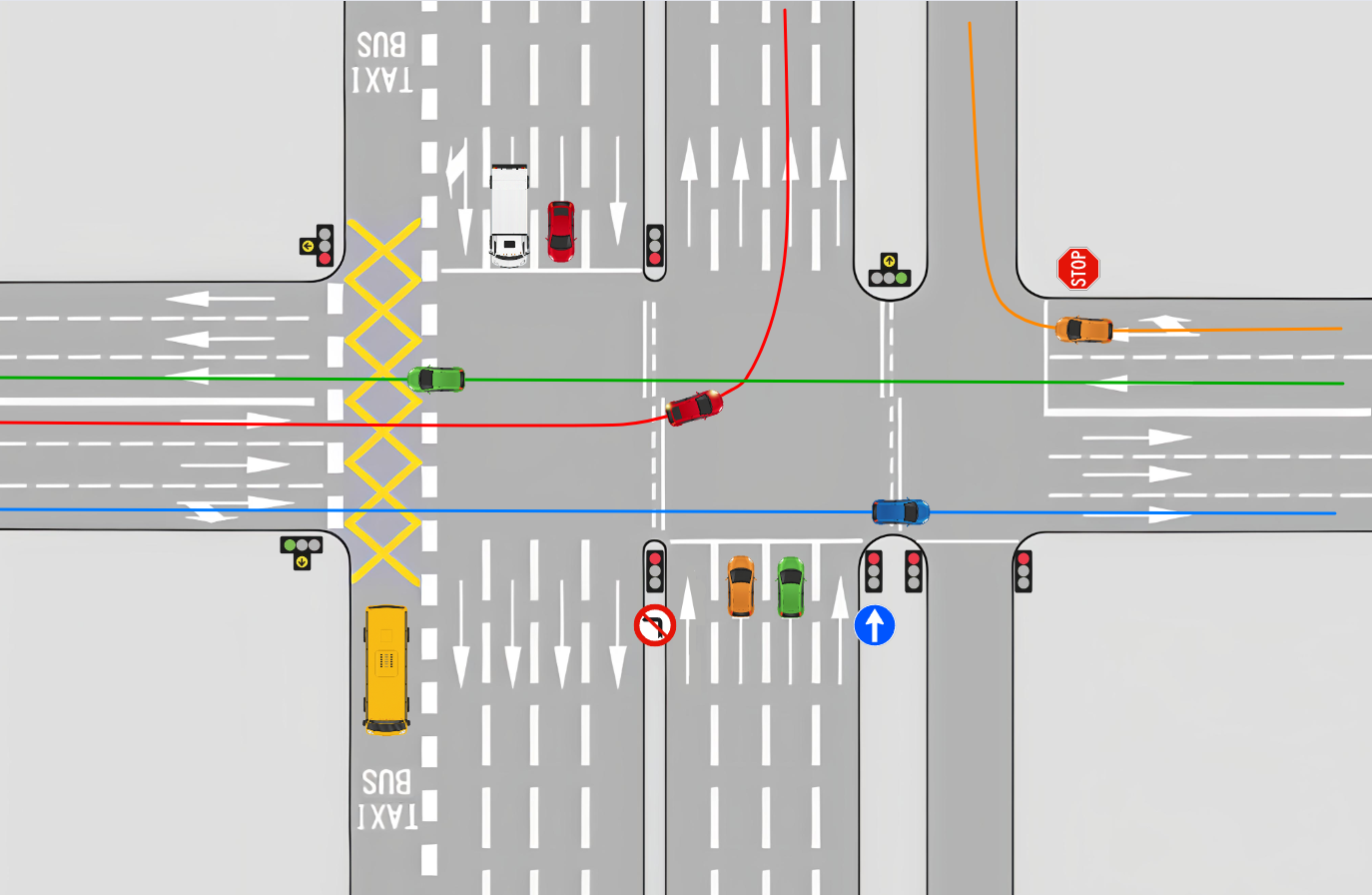
Draw any manoeuvre, animate vehicles on real maps or custom backgrounds, and get the student to understand in seconds what would take minutes in words. Works on any device with a modern browser — tablet, laptop, desktop or classroom projector.
You sign up and use it, with no credit card, with the features and limits of the free plan.
Real maps, video, multiple scenes and unlimited projects. You only pay if you ever decide to subscribe, with no lock-in.
The first time you enter. When it ends you move to the free plan: nothing is charged and there is nothing to cancel.
✓ Available · Free
Designed for driving school instructors who want to save time and get their students to understand the first time. No installation, no learning complicated software: open the browser and start teaching.
Cars, motorbikes, buses, trucks and lorries with independent paths. Sync times, pauses and directions.

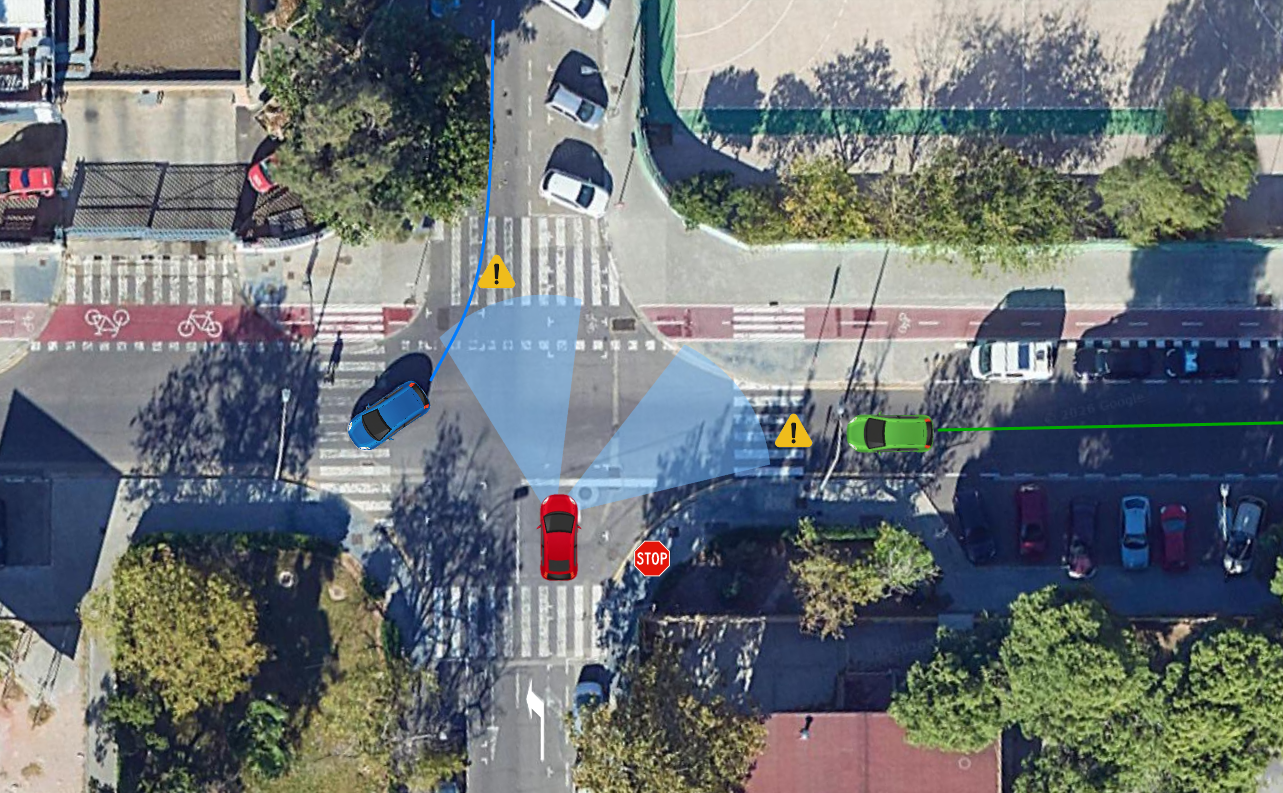
Build the same intersection with several variants — a zebra crossing, a car double-parked, a pedestrian crossing — and switch between them instantly.
Overlay your paths on the real map of your city. Explain the exam in the very area where it takes place.

Tablet in class, laptop at home, projector in the classroom or phone on the go. You only need a browser.
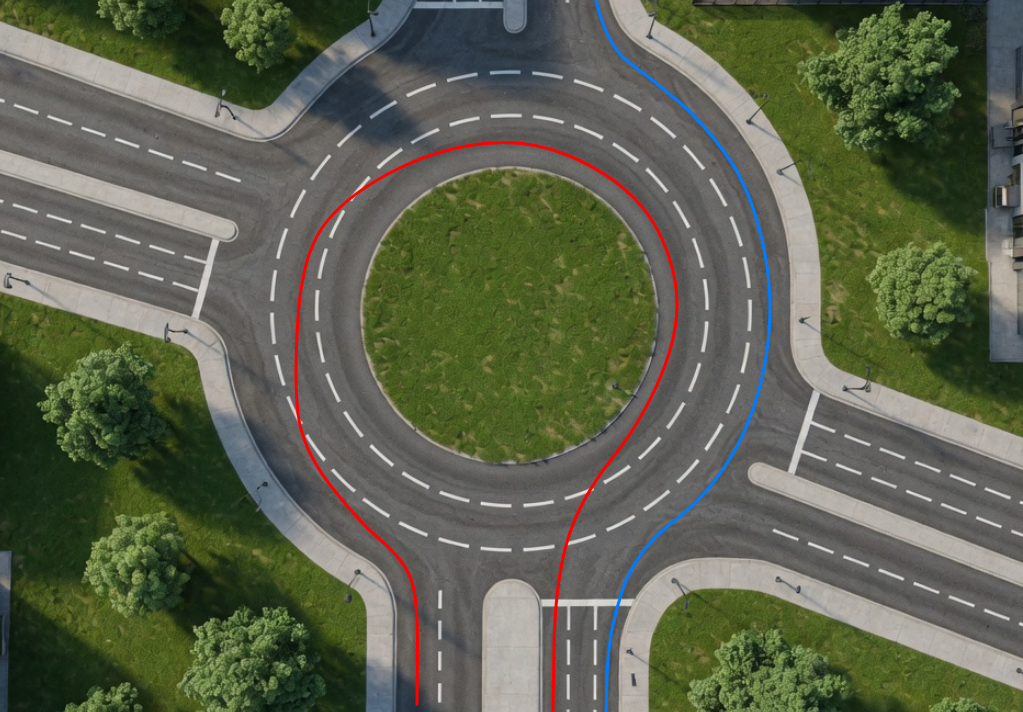
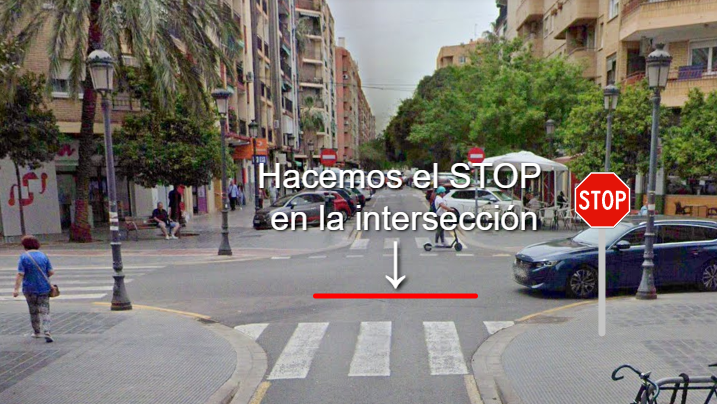
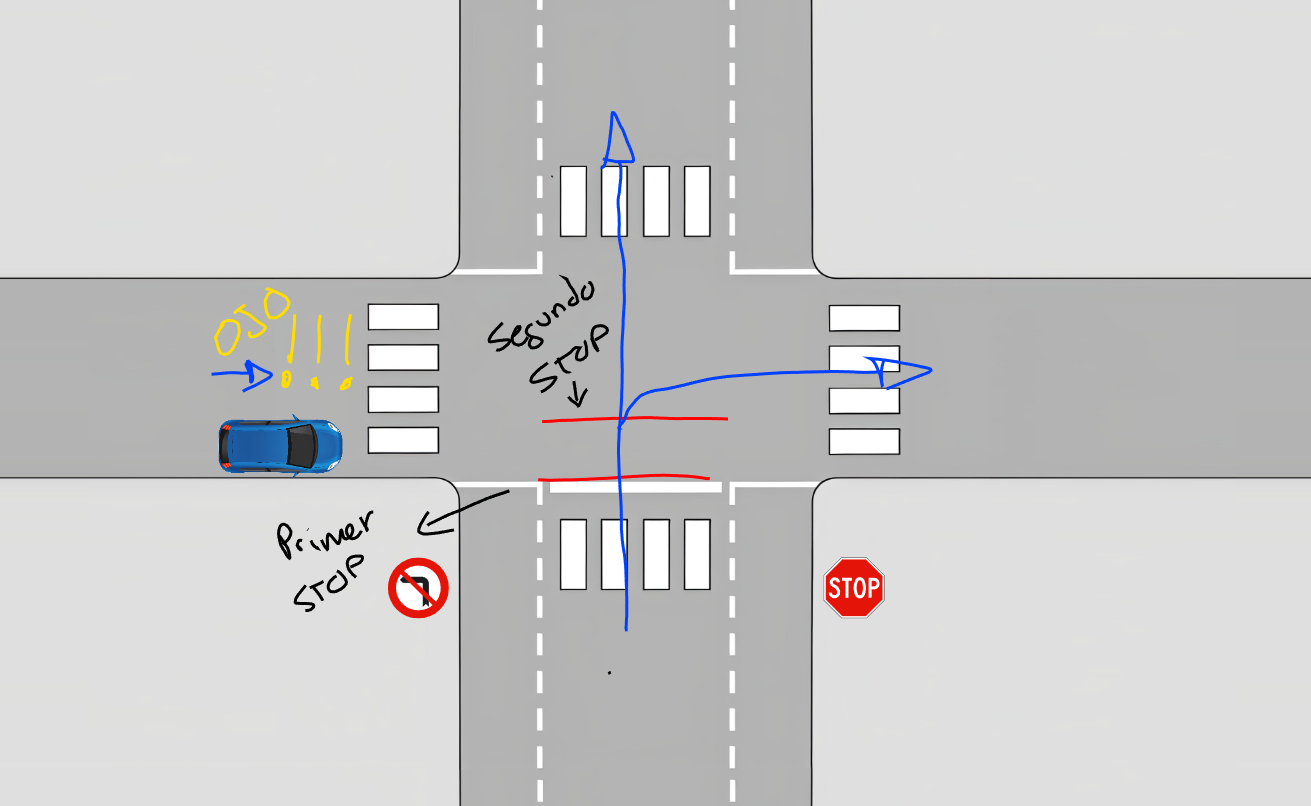
No setup needed. Open the browser and start teaching.



If you work in road safety training, DatomWorx saves you time and improves your students' understanding.
If you teach theory classes or practical case explanations in the classroom, replace the chalkboard with an animated projection.
When you stop to discuss a manoeuvre in the car, open the tablet and explain with drawings what just happened on the street.
You sign up for free and use the app with no card. As a gift, the first time you enter you can try the PRO features for a few days. When it ends, you move to the free plan: nothing is charged.
Just email or your Google account. No credit card. Instant access to the simulator.
For a few days you get the advanced features: real maps, video, sharing, multiple scenes. It's optional and costs nothing.
When the trial ends nothing is charged and there is nothing to cancel. You carry on with the free plan and your projects stay intact.
Only if it suits you, you subscribe. If not, you stay on the free plan. You decide when, and whether, to take the step.
Use it for free, no credit card. And as a gift, the first time you enter, 30 days to try the PRO features.
Free, no credit card. And as a gift, the first time you enter, 30 days of trial of the PRO features.
Everything a driving school instructor needs.
149 € a year (save 17%)
All prices are final. Taxes included.
Yes, it's free: you sign up and use it with no credit card, with the features and limits of the free plan. On top of that, the first time you enter you get 30 days to try the PRO features, as a gift (during the trial the free plan's saving quotas stay in place: projects, templates and monthly captures). When it ends, you move to the free plan: nothing is charged and there is nothing to cancel. Going PRO is optional.
Yes. No commitment, no catches. You cancel from your account and keep Pro access until the end of the period already paid for. After that, your account automatically returns to the free plan — your projects are NOT deleted.
Your work stays intact. Only the free plan's limits apply from that point on (limited monthly captures, no multiple scenarios or real maps, no video). If you renew, you get everything back instantly.
You only pay if you decide to subscribe to PRO; the free plan doesn't ask for a card. Payment is secure through Stripe, by card. We don't store your card details — Stripe handles them directly with bank-grade encryption, and from your account you can open its portal to see your receipts or change card whenever you like.
The annual plan works out at 12,42 €/month (compared to 14,99 € for the monthly one). If you think you'll use the simulator all year, annual saves you 30,88 € a year. If you'd rather test the waters without a long commitment, start with monthly.
On any device with a modern browser: tablet, laptop, desktop, phone and a projector connected to a computer. The experience is best on 10–12" tablets (iPad, Samsung Galaxy Tab, Lenovo Tab and similar) and on laptop/desktop with a projector for theory class. It works directly from the browser, and you can optionally install it as an app from the browser itself (Chrome → "Install app").
The Pro plan allows up to 2 simultaneous devices with the same account (for example, the classroom tablet, the home laptop or the phone). On the Free plan you can use your account from several devices, but we don't keep a strict count.
Yes. Everything is hosted on European servers (Hostinger, Lithuania), with encryption in transit (HTTPS) and daily backups. In line with the GDPR: you can download all your data or delete your account whenever you want from your profile.
The simulator works in 6 languages: Spanish, English, French, German, Italian and Portuguese. The language adjusts automatically to your browser's and you can change it manually at any time from your account.
You open it in class and project it at real size. You open it in the car and explain in seconds. It works on whatever device you already have: tablet, laptop, desktop, projector or phone.
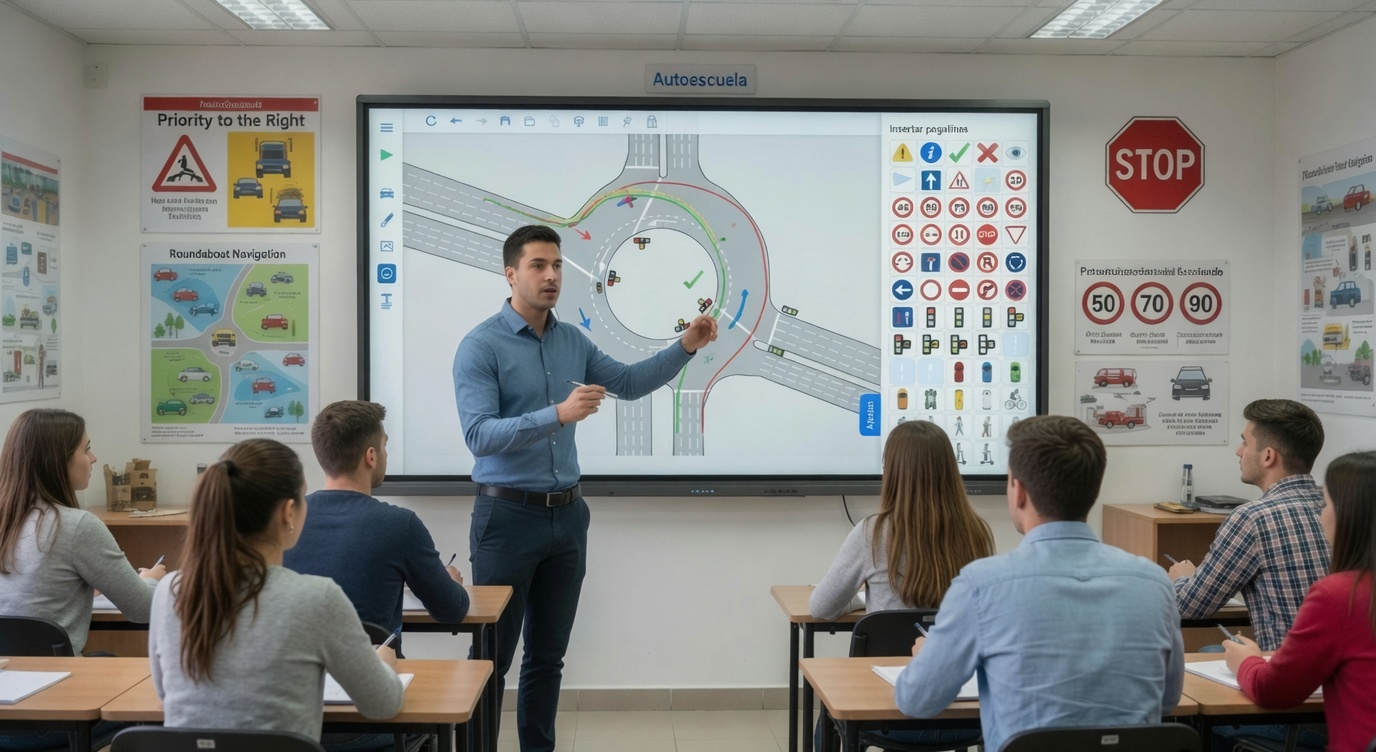
Connect your laptop to the projector and show the manoeuvres at real size. Students stop having to imagine the situation: they see how the car enters the roundabout, how it positions itself at an intersection, how it changes lanes. The visual explanation replaces the chalkboard and cuts the "I can't see it" moments to almost zero.
When you come back from a failed manoeuvre, get out the tablet and draw on the map what just happened. The student links the theory to the situation they've just experienced — and that's what makes them really learn.
Fine for reviewing
Handy for reviewing saved projects or making quick edits, but the small screen limits the detail.
Recommended
The ideal balance between portability and drawing space. iPad, Samsung Galaxy Tab, Lenovo Tab P12 and similar work perfectly.
An active stylus is recommended. It's not essential, but it makes a big difference when tracing curves and drawing fine manoeuvres. Apple Pencil, Samsung S Pen, Lenovo Precision Pen, Huawei M-Pencil… any battery-tip stylus (not the passive rubber ones).
Ideal for theory class
A perfect combination for classrooms. You control it from the laptop and the students see it at real size. Even better with a touchscreen.
Create your free account and try the simulator in under 2 minutes. No card, no commitment.
No credit card · No commitment · In your browser
All the official grading criteria for the DGT's practical driving exam — on-road driving and closed-circuit manoeuvres — in one fast app. Designed for examiners and instructors: search for the fault instantly, filter by licence and calculate the result according to the official scale. Works on any phone or tablet, and you can install it as an app. And if you use it outside Spain, it includes a generic mode for defining your own criteria and grading method, in your own language.
Grade road exams and track tests (Destreza) with the official DGT scale. No credit card.
Saving your exams with history, the rules for each fault, your own keywords and your driving school's logo. No lock-in.
The first time you enter. When it ends you move to the free plan: nothing is charged and there is nothing to cancel.
✓ Available
Forget about searching through PDFs during the exam. Type what you see ("traffic light", "indicator"…) and the exact criterion appears in seconds, with its clause number, its fault type and its clarifying note.
Grade the exam on open roads (Road) or the closed-circuit track tests (Manoeuvres: motorcycle, lorry, coach and trailer manoeuvres…), each with its own fault catalogue and official scale.
All the DGT's eliminatory, serious and minor faults for the on-road exam, with their clarifying notes 📌, organised and up to date.
Shows only what applies to the licence you're examining: A, B, C, D and the +E ones.
The DGT's official criteria PDFs (on-road and manoeuvres), always accessible from the menu, in case you want to check the source.
✓ During the test
You log each fault on the spot and the app does the rest: it counts repetitions, watches the time and applies the official scale to give you PASS or FAIL. And if you have to leave the app halfway through the test, everything's just as you left it when you come back.
If the student repeats the same mistake, a tap on "+" logs it (×2, ×3…), without duplicating cards.
A phone call, switching apps, the screen locking? When you come back, the faults, notes and stopwatch are restored — and it kept counting real time.
PASS or FAIL calculated automatically, with the fault breakdown, the stopwatch and your observations.
⭐ With the Pro plan
Save each test with its student, its area and its strictness level, and pull it up when the student (or their parent) asks why they failed. And if a fault is challenged, show them the regulation article and its penalty, with the sign on screen.
With a search bar and filters by result, area and strictness level. Any exam can be reviewed, edited or linked to the recorded route in the Rutas app.
The RGC article backing it, its text and the fine it would carry on the street — with a full-screen image gallery of the signs.
Vertical signs and road markings, speeds and blood-alcohol limits, lighting, lanes, penalties, and licences and ages.
Add your own terms to any criterion so you can find it the way YOU call it.
🌍 Outside Spain
If you don't examine with the DGT scale, turn on the generic version: define your own criteria and choose how the result is decided — by faults with limits, by points (adding or subtracting) or by competencies with critical manoeuvres. And use it in your own language.
Faults with a cap per type, points with a configurable threshold, or a competency checklist with critical failures that fail the test.
UK, Germany, Italy, Portugal, France… a ready starting point to adjust to your local rules.
Each exam links to the recorded route of its journey. They pair up automatically by time — you just confirm.
On that route, mark the faults made and open them as Simulador scenes to explain them to the student.
Your students appear when you save the exam, and their record links to all their results.
Log in from your phone's or tablet's browser, or install it as an app.
With email or your Google account. Instant access.
Type what you observe and filter by the licence you're examining.
Mark each fault during the test, with the stopwatch running.
The app calculates the result according to the DGT's official scale.
A quick help to always have the official criterion clear.
Check the exact criterion during the test and log faults with the scale always in view.
Teaches your students how the exam is really graded and why each manoeuvre is penalised.
Studies and memorises the grading criteria with a quick search and filters by licence.
Grading is free and we don't ask for a credit card. PRO is optional; the first time you enter you can try it for 14 days, as a gift.
Free, no card. Everything essential for grading.
Advanced features for driving schools and instructors.
40 € a year (save 7,98 €)
All prices are final. Taxes included.
Road is the exam on open roads, with the official DGT criteria (over 330). Manoeuvres are the closed-circuit track tests: reversing, parking or trailer coupling, each with its own fault catalogue and official scale. Grading is free in both; with Pro you can save the exams of both.
For Road exams it includes over 330 official DGT criteria (eliminatory, serious and minor) with their notes, and for Manoeuvres the manoeuvres and faults from the official closed-circuit document. If in doubt, the official DGT documents always prevail, and you'll find them linked inside the app.
No. Exámenes DW works completely on its own. If you also use Prácticas or Rutas, they connect automatically: your students appear when you save an exam and each exam can link to the recorded route — but it's an extra, not a requirement.
They're not deleted. They stay saved in your account and you'll see them again as soon as you reactivate the Pro plan.
Grading with Exámenes is free and we don't ask for a credit card. The PRO plan is optional (saving your exams, seeing the rules for each fault and more). And as a gift, the first time you enter you get 14 days to try PRO; when it ends, you move to the free plan with no charges and nothing to cancel.
Yes. European servers, HTTPS encryption and backups. In line with the GDPR: you can download or delete your data whenever you want.
Works really well
The catalogue, search and fault log work perfectly; handy if you prefer examining with your phone in hand.
Recommended
The ideal size for grading during the test: criteria, fault counter and stopwatch in view without straining your eyes.
For studying
Handy for reviewing criteria, guides and regulations on a big screen — ideal for exam candidates and for preparing lessons.
Create your account and have every DGT criterion in your pocket, on your phone, tablet or computer.
In your browser, or install it as an app
For driving schools and instructors: plan lessons, track every student, grade their manoeuvres and save exam routes — from your phone, tablet or computer.
Student records, manoeuvre grading, on-screen signatures and the official PDF record. No credit card.
Calendar with repeats, importing students from Excel, statistics and team management; it also switches on Rutas and Vehículos. No lock-in.
The first time you enter. When it ends you move to the free plan: nothing is charged and there is nothing to cancel.
✓ For driving schools and instructors
Schedule lessons and exams in a clear weekly calendar, and have each student's record at hand with their progress, their readiness bar and their full history.
Lessons, exams and events in your own colours; repeat a lesson on more days with a weekly pattern in two taps.
Each student with their exam-readiness bar, the manoeuvres they've worked on and the recommendation for the next lesson.
Mark each lesson as attended, missed or cancelled, and check all the day's lessons and exams at a glance.
✓ The system you use today
Each student has a syllabus split into stages, from first contact with the vehicle to the mock exam. In every lesson you set the mastery level of their exercises and the app calculates the progress on its own — no stars to fill in by hand.
From "First contact" to "Exam preparation", each with its own practice setting, its exercise of the day and its own threshold to consider it passed — and you decide how many stages to have and how to organise them.
Raise or lower the level of each manoeuvre with a tap; the total progress ring and the stage's % update instantly, with notes per exercise.
The student and the instructor sign with a finger at the end of the lesson, and the record is generated by filling in the DGT's official template.
⭐ With the Pro plan
The stats panel turns your lessons and exams into answers: how many students you pass, how long it takes them to reach PASS and where they get stuck — by year, by month and by student.
By year and by month, to see the real trend in your results.
The progress of their manoeuvres and the distribution of attempts until PASS.
Who passes with fewer lessons, places and examiners, and the time from start to PASS.
| YEAR | PRESENTED | PASSED | FAILED |
|---|---|---|---|
| TOTAL | 153 | 116 | 37 |
| 2026 | 34 | 26 | 8 |
| 2025 | 87 | 67 | 20 |
| 2024 | 32 | 23 | 9 |
Each student's record links to their graded exams: result and faults, one tap away.
Their recorded routes, from their record; and your students carry over to Rutas without having to enter them again.
Choose the vehicle when grading the lesson and its mileage updates on its own in its record.
No loose papers or spreadsheets: every lesson gets logged.
The driving school invites its instructors and they sign up their students.
Schedule each student's lessons and exams in the calendar.
Grade each manoeuvre, add observations and record the signature.
Check each student's history and prepare them for the exam.
Each profile logs in with their own account and sees only what they need.
The manager or the office staff handle calendars and sign-ups for any instructor with specific permissions, and every change is logged.
Manage your schedule, grade every lesson, charge by voucher or by lesson and prepare your students for the exam.
Their own portal: lesson calendar, a reminder before every lesson and the notes their instructor leaves them.
Free, no credit card. And as a gift, 30 days to try PRO the first time you enter. No lock-in.
Free, no card. Day-to-day work with your students, at no cost.
Everything a driving school needs to manage its lessons.
149 € a year (save 30,88 €)
All prices are final. Taxes included.
No. It works from the browser on any device and, if you want, it installs as an app in one tap from the browser itself.
With their DatomWorx account. The driving school invites its instructors with its code, and students log in to their portal with the link their instructor shares; each one sees only what applies to them.
No. Prácticas works fully on its own. If you also use Exámenes or Rutas, each student's record links to their graded exams and recorded routes. And with the PRO plan (or its trial) of Prácticas, or of another of the three apps, Rutas and Vehículos switch on too.
Prácticas is free and we don't ask for a card. On top of that, the first time you enter you get 30 days to try PRO, with everything included. When it ends, you move to the free plan: nothing is charged and there is nothing to cancel. Going PRO is optional.
Secure payment with Stripe. We don't store your card details, and from your account you can access your receipts whenever you need them. No commitment: cancel whenever you want and your data isn't deleted.
Yes. European servers, HTTPS encryption and backups. In line with the GDPR: you can download or delete your data whenever you want.
Great backup
Check the schedule and grade on the go; everything works, though with less screen space.
Recommended
Handy in the car and between lessons: grading manoeuvres, collecting on-screen signatures and reviewing records is more enjoyable on a bigger screen.
Great for the office
For planning the weekly calendar calmly, importing students from Excel and printing PDF records.
Calendar, students, manoeuvres and routes, all in one place.
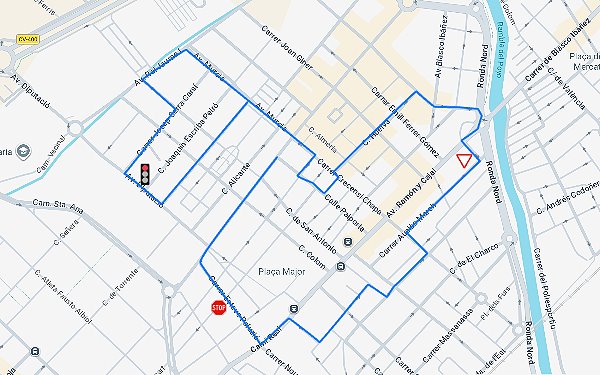
Record the route of every lesson and every exam by GPS from your phone, save it by student and area, and schedule the day's agenda so every route records and saves itself.
Rutas has no price of its own: it switches on with the PRO plan (or its trial) of another DatomWorx app.
With PRO in just one of Prácticas, Simulador or Exámenes you already have it. You can keep using the others for free.
It's the cheapest PRO right now (Exámenes DW). With it you already get Rutas, Vehículos and the Community.
Your saved routes aren't deleted: you can see them, but not create or edit.
✓ Press record and drive
Put your phone in the car, press record and drive. The app traces the route by GPS and saves it by student and area, ready to view again on the map or share whenever you want.
The route traces itself on the real map while you give the lesson or the exam; wait for a good signal before starting and it filters out GPS noise.
Schedule the day's routes with their student and duration: it warns you before starting, they stop and save themselves once their time is up, and they chain into the next one.
Battery-saving mode that dims the screen without stopping the recording, and a warning so your phone doesn't cut off the GPS. No signal? You can also trace a route by hand on the map.
✓ Connected with the rest of the platform
Rutas doesn't work alone: it brings in your students from Prácticas and your areas from Exámenes without entering them twice, links the Simulador's projects on the map, and lets you share routes by QR or export them to GPX.
What you create in Prácticas or Exámenes appears here automatically.
Pin a point on the route and open it as a Simulador sketch.
Send a route to a colleague by link or QR code (with no data about your student), download it as GPX or open it in Google Maps.
✓ To review and improve
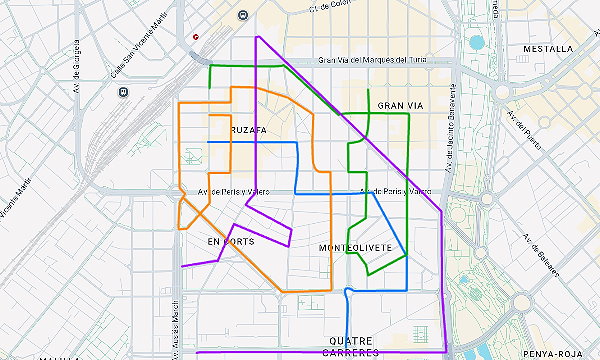
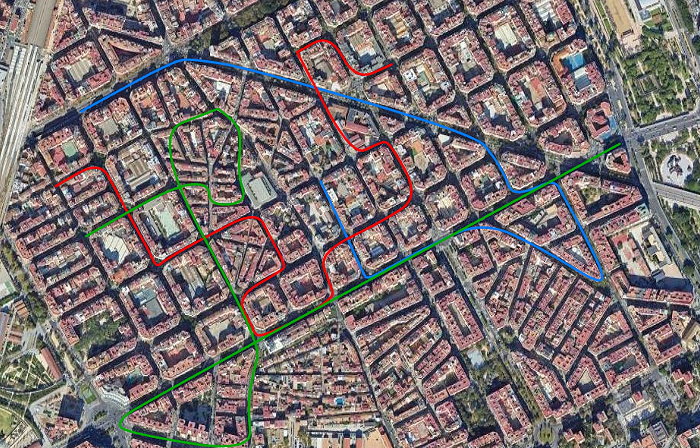
Overlay a student's routes to see at a glance which areas they've covered and which they're missing. Link the exam you did with its route, and mark on the map the points where they failed to simulate that manoeuvre in the Simulador.
Overlay the student's routes, each in a different colour, and check which areas they've worked on and which ones are still left.
Link the graded exam with the route you recorded at the same time, with its result always at hand.
Pin a point where the student failed, with its traffic sign and the fault type (minor, serious or critical), and open it as a sketch in the Simulador to practise that situation.
 Blocks a Yield sign
View in Simulador App →
Blocks a Yield sign
View in Simulador App →
 Runs a red traffic light
View in Simulador App →
Runs a red traffic light
View in Simulador App →
 Doesn't perform the STOP properly
View in Simulador App →
Doesn't perform the STOP properly
View in Simulador App →
Rutas isn't sold separately and has no sign-up of its own: it switches on with the PRO plan (or its trial) of any other DatomWorx app. PRO in just one (Prácticas, Simulador or Exámenes) is enough, and you can keep using the others for free. Sign in with that same account and Rutas opens on its own.
It switches on by itself with your PRO (or its trial) from another app: no need to sign up again.
Each profile gets a different use out of the same recorded routes.
Record the real route of every lesson or exam and save it by student and area, ready to review whenever you want.
Reviews the areas they've already covered and spots at a glance which ones they're missing before the exam.
Needs PRO (or its trial) in Prácticas, Simulador or Exámenes; one is enough.
Rutas has no price of its own: it switches on with the PRO plan (or its trial) of any other DatomWorx app, with the same account. PRO in just one app is enough; you can keep using the others for free.
Your saved routes aren't deleted. Rutas switches to read-only mode: you can still see everything of yours, but to create, record or edit you need PRO (or its trial) again in some app.
No: browsers cut off GPS in the background, so the screen has to stay on. That's what the battery-saving mode is for — it dims the screen without stopping the recording.
Recommended
It's the one you carry in the car, and its GPS usually gets better coverage than a tablet's. It can keep recording while you use the tablet for another app.
For reviewing
Good for viewing routes bigger and overlaying several when reviewing covered areas with the student.
Just for checking
Handy for reviewing, sharing and exporting routes. GPS recording is the phone's job, though from here you can also trace routes by hand.
MOT, insurance, services and maintenance with a reminder before they expire; refuels, mileage and breakdowns logged car by car.
Vehículos has no price of its own: it switches on with the PRO plan (or its trial) of another DatomWorx app.
With PRO in just one of Prácticas, Simulador or Exámenes you already have it. You can keep using the others for free.
It's the cheapest PRO right now (Exámenes DW). With it you already get Rutas, Vehículos and the Community.
Your vehicles aren't deleted: you can see them, but not create or edit, and you won't get ITV and insurance reminders.
✓ Switches on with PRO (or its trial) of any app
Register each vehicle once and always have its full record at hand: MOT date, insurance and next service, with a reminder as they approach. The maintenance book keeps track of what was done, at which workshop and for how much.
MOT, insurance and service in green, amber or red depending on how close the date is — and a notification on your phone before they expire, with as much notice as you choose.
What was done, at which workshop, when and for how much, with a photo of every invoice. Plus a log of breakdowns, damage and accidents with their photos and the status of the report.
By date or by mileage ("oil change at 130,000 km"): the app tells you when it's due and who's in charge.
✓ For driving schools with several instructors
Every refuel gets logged with its litres, price and a photo of the receipt, and the odometer is always up to date — it even updates itself from the Prácticas app when grading each lesson.
When you grade a lesson in the Prácticas app with its vehicle and its final mileage, the car's odometer updates here automatically.
Share a car with another instructor: you both log mileage, refuels and breakdowns, with a notice for every update.
Vehículos isn't sold separately and has no sign-up of its own: it switches on with the PRO plan (or its trial) of any other DatomWorx app. PRO in just one (Prácticas, Simulador or Exámenes) is enough, and you can keep using the others for free. Sign in with that same account and Vehículos opens on its own.
It switches on by itself with your PRO (or its trial) from another app: no need to sign up again.
Each profile gets a different use out of the same vehicle data.
Tracks the MOT, insurance and fuel consumption of their own car without spreadsheets or loose reminders.
Full history of what was done, at which workshop, when and for how much — with every invoice saved.
Needs PRO (or its trial) in Prácticas, Simulador or Exámenes; one is enough.
Vehículos has no price of its own: it switches on with the PRO plan (or its trial) of any other DatomWorx app, with the same account. PRO in just one app is enough; you can keep using the others for free.
Your vehicle data isn't deleted. Vehículos switches to read-only mode: you can see records, histories and expenses, but to create or edit you need PRO (or its trial) again in some app. In the meantime you won't receive the ITV (inspection) and insurance reminders.
Yes. You can share a vehicle with a colleague so you both log mileage, refuels and breakdowns, and notify each other within the app.
Recommended
You get ITV, insurance and service reminders wherever you are, and take the photo of the receipt or workshop invoice on the spot.
Very handy
Perfect for reviewing each car's record, the logbook and the maintenance book with more screen space.
For catching up
Handy for reviewing the fleet calmly. Remember notices reach whichever device has notifications turned on.
Do you use more than one tool? The packs work out cheaper than getting them separately.
Pack Simulador de tráfico + Exámenes prácticos
169 € a year
Pack Prácticas alumnos + Exámenes prácticos
169 € a year
Pack Prácticas alumnos + Simulador tráfico
219 € a year
Pack triple Prácticas alumnos + Exámenes prácticos + Simulador de tráfico
249 € a year
All prices are final. Taxes included.